REVIEW · ISTANBUL
Pocket Wifi Turkey- Unlimited
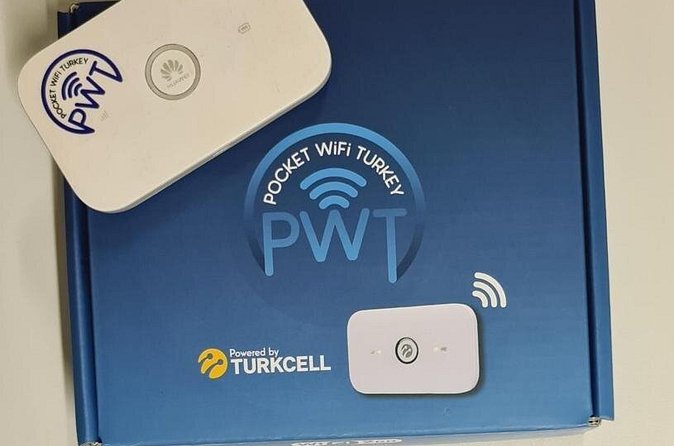
Your pocket can become a Wi‑Fi hotspot fast. This Pocket Wifi Turkey – Unlimited plan gives you a small wireless router that works with a SIM card, and it’s handled by Turkcell’s official agent, so they register your SIM on your behalf and activate your internet. I like the simplicity of having unlimited mobile data in one device you can share, and I also like that the Turkcell SIM registration is taken care of for you. The main thing to watch is that you must hand over your passport and sign a subscription agreement, and if signal issues happen later, you’ll need to contact the 24/7 number printed on the box.
You’ll pick up and return at Istanbul Airport near Tayakadın (Terminal Caddesi No:1), with the listed start time at 12:00am. The rental runs from 1 to 30 days, depending on what you book, and it ends back at the meeting point.
In This Review
- Key Pocket WiFi Turkey Facts to Know
- Pocket WiFi at Istanbul Airport: What You Actually Walk Away With
- How the Turkcell SIM Registration Works (Passport In Hand)
- Unlimited Data in Istanbul: Where It Really Helps
- Pickup at Istanbul Airport (Tayakadın, Terminal Caddesi No:1)
- Return Routine: Keeping It Simple and On Time
- Choosing Your Rental Length (1 to 30 Days)
- Price and Value: Is $60.47 Worth It?
- One Risk to Know: Signal Drop After a Few Days
- The Real-World Setup: Tips That Save You Time
- Who Should Book Pocket Wifi Turkey – Unlimited
- Should You Book It? My Practical Recommendation
- FAQ
- Do I need a passport for Pocket Wifi Turkey – Unlimited?
- Is the pocket WiFi router unlimited?
- Where is the meeting point in Istanbul?
- How long can I rent it?
- When does the pickup start?
- Can I cancel for a full refund?
Key Pocket WiFi Turkey Facts to Know
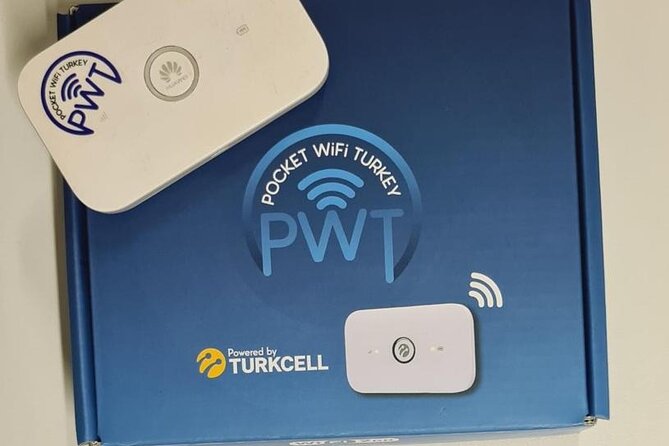
- Unlimited data on a pocket router you can use across multiple devices
- Official Turkcell agent handles SIM registration so you skip the fiddly setup
- Passport required for the registration and you’ll sign an agreement
- Works as a personal Wi‑Fi zone you can share with travel companions
- Pickup at Istanbul Airport (Tayakadın, Terminal Caddesi No:1) for easy arrival-day setup
- If signal drops, use the 24/7 support number on the box right away
Still deciding? Here is how a few Istanbul favourites compare with this one:



Pocket WiFi at Istanbul Airport: What You Actually Walk Away With
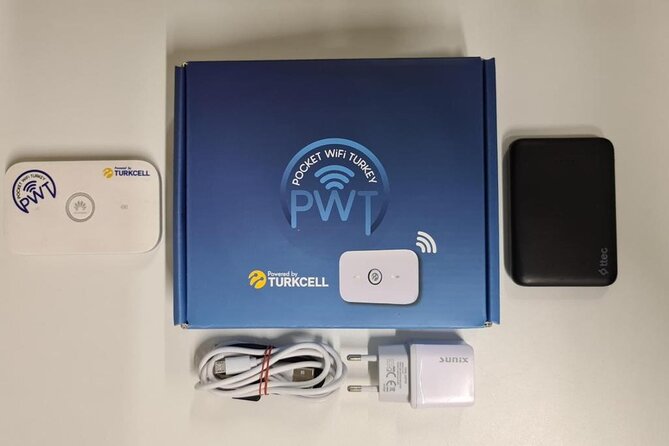
This isn’t a “tour” in the sightseeing sense. It’s a practical service that turns your arrival day into less stress day. You’ll collect a pocket-size router that creates your own Wi‑Fi zone. Think of it as a moving internet hub you carry in your pocket, not something you have to rely on random café Wi‑Fi.
You’re booking Pocket Wifi Turkey – Unlimited, so the big promise is steady access to internet during your stay. That matters in Istanbul, where navigation, schedules, and translation help can make or break your day. With pocket WiFi, you can also avoid the “I’ll just use the airport Wi‑Fi for a few minutes” spiral.
One more detail I appreciate: this device is designed to be shared. The idea is that your phones and tablets can connect to the router, which is handy if you’re traveling with a friend, partner, or family.
How the Turkcell SIM Registration Works (Passport In Hand)
Here’s the core workflow. Pocket WiFi uses a SIM card, and you’re not just getting a device out of a box. As Turkcell’s official agent, Pocket Wifi Turkey sets up the SIM registration process for you.
That means:
- You provide your passport to their employee.
- You sign a subscription agreement for the registration.
- After that, the router is activated with your internet data.
This is a big deal because it can prevent you from spending your first hours in Turkey hunting for registration rules and SIM activation steps. It also reduces the chance that your “just buy a SIM at the airport” plan turns into a line-and-wait problem.
The trade-off is personal: you’re handing your passport to get the SIM registered. If that makes you uneasy, it’s worth thinking about before you book. I’d also suggest keeping your passport secure afterward and not leaving the pocket WiFi handoff with half-finished paperwork.
Unlimited Data in Istanbul: Where It Really Helps
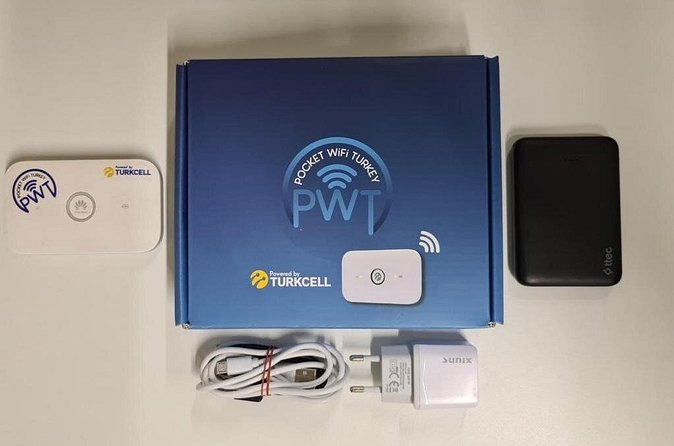
Unlimited is one of those words people toss around. What it means for you in daily travel is simple: you don’t have to ration your internet time.
In Istanbul, you’ll likely use data for:
- Maps and navigation for streets that don’t always feel intuitive
- Translation tools when menus and signs get tricky
- Messaging and calls through apps when Wi‑Fi isn’t reliable
- Booking rides or checking route options without guessing
Pocket WiFi shines here because you’re not stuck near a single Wi‑Fi source. The router is portable, so your connection goes where you go.
Also, because the device creates a personal Wi‑Fi zone, you’re less dependent on one person’s phone hotspot. If you’re with others, everyone can connect without draining one device’s battery or arguing about who gets the connection.
- Best of Istanbul 1, 2 or 3-Day Private Guided Istanbul Tour★ 5.0 · 8,922 reviews
- Istanbul: Basilica Cistern Fast-Track Entry and Audio Guide★ 4.6 · 7,521 reviews
- Istanbul: Hagia Sophia Skip-the-Line Ticket & Museum Option★ 3.7 · 4,958 reviews
- Istanbul: Hodjapasha Whirling Dervishes Show & Exhibition★ 4.4 · 4,790 reviews
Pickup at Istanbul Airport (Tayakadın, Terminal Caddesi No:1)
Your meeting point is Istanbul Airport, Tayakadın area: Terminal Caddesi No:1, 34283 Arnavutköy/İstanbul, Türkiye. The start time is listed as 12:00am, and the activity ends back at the meeting point.
On paper, that sounds straightforward. In real life, arrival day is when things go sideways: delays, baggage searches, and the simple fact that airports are big. So I recommend you treat the Wi‑Fi pickup like part of your first-day plan, not an afterthought.
A practical approach:
- As soon as you land, decide when you want to pick up the router.
- Keep your passport ready so registration doesn’t become a hunt-through-bags session.
- Plan to test the connection immediately after you receive the device.
If your plan includes landing late at night or very early, confirm your timing expectations in advance because the listed start time is midnight. You don’t want to show up too early or too late and then wait in a place you don’t know yet.
Return Routine: Keeping It Simple and On Time
This experience ends back at the meeting point. That means you’re not returning it to a random city kiosk; it’s tied to the pickup location.
Because the rental duration can be 1 to 30 days, your return timing depends entirely on what you selected at booking. If you’re the type who changes plans often, give yourself a small buffer day before you need to catch flights or move on.
Also, keep the device and any accessories you received. Losing a part can be the kind of problem that turns into a time-consuming email chain. You might not control the provider’s rules, but you can control how organized you stay.
Choosing Your Rental Length (1 to 30 Days)
This is one of those services where the duration range matters more than you’d think. A short stay can still feel long without a reliable connection, especially if you’re coordinating rides, tickets, or train schedules.
If you’re booking 1 day, I treat it as an arrival-day tool:
- Get set up at the airport
- Use it to navigate your first day confidently
- Don’t rely on spotty Wi‑Fi while you figure out where you are
If you’re booking 7 to 10 days, pocket WiFi becomes your day-to-day internet:
- Always on maps
- Easy communication with people back home
- Simple access to translations and booking updates
For longer stays up to 30 days, the value tends to compound. You stop thinking about internet and start thinking about your trip.
Only you know your travel style. If you’re constantly online—maps, messages, rides—longer is usually less hassle per day.
Price and Value: Is $60.47 Worth It?
The price is listed as $60.47 per group, up to 1. Since it’s “unlimited,” you should judge value by how much you’d otherwise pay for multiple SIM cards, roaming, or last-minute fixes.
Here’s a fair way to think about it:
- If you’re traveling alone and you use data heavily, pocket WiFi can be cheaper than roaming add-ons and far less annoying than constantly searching for Wi‑Fi.
- If you’re traveling with someone, value improves because the device is shareable. That means the same rental supports more than one phone without each person buying their own setup.
- If you only need internet occasionally, this could still be worth it—but you’d be paying for convenience, not just connectivity.
Because the price is a flat per-group figure, it’s best suited for travelers who want one clean solution right away. It’s less ideal if you’d prefer a do-it-yourself SIM purchase every time you change plans.
One Risk to Know: Signal Drop After a Few Days
The device can be great—right up until it isn’t. In one reported experience, the Wi‑Fi worked well for the first few days, then the signal disappeared. The person couldn’t place phone or WhatsApp calls to ask about the status.
That scenario is worth taking seriously, because if your connection is down and you rely on apps for communication, you suddenly lose your safety net.
The helpful part: support exists. The provider response highlights that there’s a phone number on the box and you can reach them 24/7. So your best move is simple:
- Save the support number the moment you pick up the device.
- If the Wi‑Fi acts odd, troubleshoot early while you can still contact them easily.
Also, test right away on day one. If you discover a problem immediately, you’re more likely to fix it without losing days to uncertainty.
The Real-World Setup: Tips That Save You Time
This service is designed to be easy, but you’ll still get better results if you show up prepared.
Here’s what I recommend you do before you meet the agent:
- Bring your passport and be ready to hand it over for registration.
- Have your booking info handy, since you’ll be asked to confirm what you’ve reserved.
- Think through how many devices you want connected. Pocket WiFi is about sharing your personal zone, so set expectations with your group.
Then once you have the router:
- Turn it on and connect one phone first.
- Check if you can load basic websites and use your key travel apps.
- If you rely on WhatsApp for communication, make sure it works using the pocket Wi‑Fi, not random other networks.
If you get stuck, the phone number on the box is your lifeline, and it’s listed as 24/7 support. That’s the practical reassurance that turns “signal trouble” into “a fixable problem” rather than a trip-ruiner.
Who Should Book Pocket Wifi Turkey – Unlimited
This fits best if you want a straightforward internet setup in Istanbul and you don’t want the SIM registration hassle on your arrival day.
You’ll likely love it if:
- You want reliable internet for maps and messaging
- You’re traveling as a duo or small group who can share one router
- You prefer airport convenience over experimenting with local SIM purchases
You might skip it if:
- You’re uncomfortable giving your passport for registration
- You only need occasional data and you’re fine with limited Wi‑Fi
- You plan to keep all communication offline and rarely use phone apps
Because the listed note says most travelers can participate, it doesn’t sound like there are heavy restrictions. Still, passport handling and agreement signing are the two real “are you okay with this?” points.
Should You Book It? My Practical Recommendation
If your priority is staying connected without stress, this is a strong choice. The biggest win is that you get a pocket router plus Turkcell SIM registration handled for you, right at the airport. For most visitors, that means faster confidence on day one and less fiddling once you’re already tired from travel.
I’d book it if you’re the type who uses internet all day—maps, translation, ride apps, messaging—and you want one clean setup. I’d hesitate only if you strongly dislike passport-based SIM registration or you expect your trip to be so offline that connectivity becomes a low priority.
FAQ
Do I need a passport for Pocket Wifi Turkey – Unlimited?
Yes. You’re required to provide your passport to the employee for Turkcell SIM registration, and you’ll sign a subscription agreement.
Is the pocket WiFi router unlimited?
The experience is listed as Pocket Wifi Turkey – Unlimited, and the router creates your own pocket Wi‑Fi zone using a SIM card.
Where is the meeting point in Istanbul?
The meeting point is Istanbul Airport, Tayakadın, Terminal Caddesi No:1, 34283 Arnavutköy/İstanbul, Türkiye.
How long can I rent it?
The duration is listed as 1 to 30 days (approx.), depending on the booking you choose.
When does the pickup start?
The start time is listed as 12:00am.
Can I cancel for a full refund?
Yes. You can cancel up to 24 hours in advance for a full refund. If you cancel less than 24 hours before the start time, you won’t receive a refund.
More Tour Reviews in Istanbul
- Istanbul: Bosphorus Dinner Cruise & Show with Private Table★ 4.8 · 62,058 reviews
- Istanbul: Daytime or Sunset Sightseeing Cruise & Audio Guide★ 4.8 · 14,430 reviews
- Istanbul: Bosphorus Dinner Cruise & Turkish Night Show★ 4.8 · 12,954 reviews
- Best of Istanbul 1, 2 or 3-Day Private Guided Istanbul Tour★ 5.0 · 8,922 reviews
- Istanbul: Basilica Cistern Fast-Track Entry and Audio Guide★ 4.6 · 7,521 reviews
- Istanbul: Hagia Sophia Skip-the-Line Ticket & Museum Option★ 3.7 · 4,958 reviews